
Most small business owners don’t have a work ethic problem. They have a systems problem. The same capable person who built something worth having spends their days buried in tasks that don’t require their judgment, expertise, or presence. Scheduling emails. Chasing invoices. Manually updating spreadsheets no one reads.
Small business automation solves that problem by removing the operational friction that eats skilled people alive. Not by replacing what makes a business human, but by building systems that handle the rest.
What You’ll Learn
- Why small businesses fail to adopt automation even when the need is obvious
- Which business processes are the highest-value automation targets
- What specific tools to consider for scheduling, invoicing, marketing, and operations
- How to start without disrupting what already works
Why Do Small Businesses Struggle to Adopt Automation?
Small businesses delay automation for three reasons: they underestimate how much time repetitive tasks actually cost, they overestimate how hard automation is to implement, and they confuse automation with complexity.
The hidden cost of manual processes is real, and it touches more of the workday than it first appears. In A Future That Works, the McKinsey Global Institute’s 2017 study led by James Manyika, researchers found that about half of the activities people are paid to do could be automated with technology that already exists. A business owner spending 90 minutes a day on tasks that sit in that automatable half loses roughly 390 hours a year. That’s nearly ten full work weeks. The tools to reclaim that time exist, most cost less than a monthly subscription to streaming services, and the majority require no technical background to set up.
The barrier is almost never technical. It’s prioritization.
Key takeaway: The question isn’t whether your business can afford to automate. It’s whether you can afford to keep doing things manually.
What Business Processes Should Small Businesses Automate First?
The highest-value targets for small business automation share three traits: they’re high-frequency, low-judgment, and failure-prone when done by hand. We call this the Discernment Filter. Run a task through all three, and the ones that pass are the work to hand off first. Scheduling, invoicing, lead follow-up, and social media publishing pass easily.
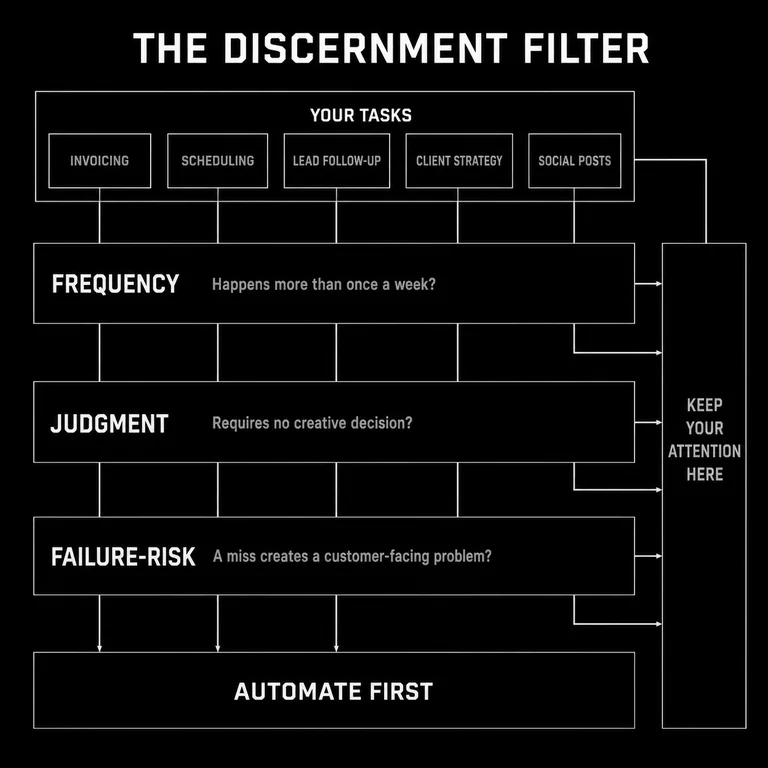
At Subverse, we make decisions by discernment: judgment measured against fixed criteria rather than preference or whatever feels urgent that week. The Discernment Filter puts that same discipline on your calendar. Instead of automating whatever’s loudest, you run each task against the three criteria and let them answer. What passes doesn’t need you. What doesn’t is where your attention belongs.
Start with the tasks that happen every week, require no creative decision-making, and have caused at least one problem in the last month because something slipped. Those are your automation priorities.
When to use the Discernment Filter:
- If a task happens more than once a week, it’s a candidate for automation
- If missing the task creates a customer-facing problem, it’s a priority candidate
- If the task requires copying information from one place to another, it should almost certainly be automated
How Does Scheduling Automation Work for Small Businesses?
Scheduling automation eliminates the back-and-forth required to book meetings, appointments, or calls. Tools like Calendly and Acuity Scheduling connect directly to a calendar, display real availability, and allow clients or prospects to book time without email negotiation.
The business owner sets parameters once: available hours, meeting types, buffer time between appointments, and confirmation messaging. After that, scheduling happens without manual involvement. The time saved is modest per instance but compounds significantly across a week.
Common failure mode: Business owners set up scheduling tools but don’t distribute the link consistently, so the tool goes unused. Build the link into email signatures, proposal templates, and contact pages to make it the default path.
Key takeaways:
- Scheduling automation works only when it becomes the default booking method
- The setup investment is typically under two hours
How Can Small Businesses Automate Invoicing and Payment Collection?
Invoicing automation generates invoices on a schedule or trigger, sends payment reminders without manual follow-up, and processes payments when clients pay online. Tools like QuickBooks, FreshBooks, and Xero handle all three.
For service businesses with recurring clients, this means invoices go out on time without the owner remembering to send them. For project-based work, invoices can be triggered by project milestones. Payment reminders send automatically at defined intervals, removing the awkward task of chasing outstanding balances by hand.
The operational benefit is time. The psychological benefit is significant: removing the friction of financial follow-up reduces one of the more stressful recurring tasks in small business ownership.
We hit this in our own studio. Invoicing ran on memory — generate the invoice, notice a week later it still hadn’t been paid, write the slightly awkward reminder, log the payment by hand. None of it needed judgment, and all of it took attention. We moved the sequence into FreshBooks: invoices send on a schedule, reminders go out on their own at set intervals, and payments reconcile without anyone opening a spreadsheet. That returned close to three hours a month. The 390-hour figure earlier in this post isn’t abstract to us. We watched one process give a piece of it back, and the relief had less to do with the hours than with no longer carrying a running tally of who owed what.
Key takeaways:
- Invoicing automation is highest-value for businesses with recurring or high-volume billing
- Payment reminders sent automatically recover more outstanding balances than manual follow-up
How Do Small Businesses Automate Social Media Without Losing Authenticity?
Social media scheduling separates content creation from content publishing. Tools like Buffer and Hootsuite allow business owners to batch-create posts during a single focused work session and schedule them across platforms in advance. Publishing happens automatically; the owner’s attention is freed for everything else.
The concern about authenticity is worth addressing directly. Scheduling posts doesn’t make them less genuine. It makes their creation more intentional. A business that publishes thoughtfully considered content on a reliable schedule builds more trust than one that posts reactively when there’s a spare moment.
Authenticity lives in the content, not the publication time.
Key takeaway: Social media scheduling makes consistency achievable without requiring daily attention. Consistency builds audiences more reliably than frequency.
How Does Lead Nurturing Automation Work?
Lead nurturing automation sends structured communication sequences to prospects based on their behavior or stage in a buying process. When a prospect fills out a contact form, downloads a resource, or clicks a specific link, the system responds with relevant follow-up. No manual action required.
Tools like HubSpot, Mailchimp, and ActiveCampaign build these sequences through visual workflow editors. A new lead might receive a welcome email immediately, a case study three days later, and a direct offer a week after that. Every step happens automatically, and the business owner sees only what requires human judgment: replies, questions, or conversion events.
The result is consistent follow-up with every lead, not just the ones remembered.
Common failure mode: Automation sequences that read like automation. Every message in a nurture sequence should sound like it was written by a person who understands the reader’s situation. Efficient delivery doesn’t require impersonal language.
Key takeaways:
- Lead nurturing automation is most valuable for businesses with long sales cycles
- Sequences need periodic review to remain relevant as the business evolves
How Can Small Businesses Provide 24/7 Customer Support Without Adding Staff?
Chatbot tools like Intercom and Drift handle common customer inquiries at any hour by responding to frequent questions with pre-built answers. When a question falls outside the chatbot’s scope, the system routes the conversation to a human or collects contact information for follow-up.
For most small businesses, the majority of inbound customer questions fall into a short list of categories: pricing, availability, process, and status updates. A well-configured chatbot handles those categories reliably and routes exceptions appropriately.
The customer experience improves because response time drops from hours to seconds. The business benefits because staff attention concentrates on conversations that actually require judgment.
Key takeaway: Chatbot automation doesn’t replace customer relationships. It removes the delay between a customer having a question and getting a first response.
What Inventory Management Automation Options Exist for Small Businesses?
Inventory management automation tracks stock levels in real time, sends alerts when inventory falls below defined thresholds, and in some cases triggers reorder processes automatically. Tools like Cin7 and similar platforms connect inventory data to sales channels, so stock levels update as orders process.
For product-based businesses, the manual alternative is periodic manual counts and reactive reordering. Automation converts that reactive process into a proactive one, reducing the risk of stockouts and the cost of excess inventory held too long.
When to use this: Inventory automation delivers the most value when a business sells across multiple channels, manages more than 50 SKUs, or has experienced stockout problems in the past 12 months.
How Does Financial Automation Help Small Business Owners?
Financial automation covers payroll processing, expense categorization, tax preparation support, and cash flow reporting. Tools like Gusto handle payroll calculations and tax withholding automatically. Xero and QuickBooks connect to bank accounts and credit cards to categorize transactions without manual data entry.
The operational gain is accuracy. Manual financial processes introduce errors that compound over time. Automated categorization and reconciliation create cleaner records that make tax preparation faster and financial decision-making more reliable.
Key takeaway: Financial automation doesn’t replace an accountant. It reduces the time your accountant spends cleaning up manual data entry, which reduces the cost of professional financial support.
What Is Workflow Automation and When Should Small Businesses Use It?
Workflow automation connects separate applications and triggers actions across them based on defined rules. A new client signs a contract, and a project management task is created automatically. A payment processes, and an onboarding email goes out. A form is submitted, and a CRM record is created without manual entry.
Tools like Zapier and Make.com enable this kind of automation through visual editors that don’t require code. The setup logic is simple: when X happens in application A, do Y in application B.
The value is in eliminating the manual handoffs between systems that create delays, errors, and forgotten steps.
When to use this: Workflow automation is most valuable when the same information needs to move between two or more separate applications regularly. If you’re copying data from one tool to another more than once a week, that process should be automated.
Key takeaway: Workflow automation is most powerful when applied to processes that cross system boundaries. The more tools your business uses, the more automation opportunities exist between them.
How Should a Small Business Start with Automation?
Start with one process. Choose the highest-frequency, lowest-judgment task that has caused at least one visible problem in the last month. Evaluate and implement it methodically: set it up, verify it works, and let it run for 30 days before adding another.
The goal in the first phase is evidence. Once you’ve seen a scheduling tool eliminate 45 minutes of email coordination a week, or an invoicing system send reminders without your involvement, the case for expanding automation becomes concrete rather than theoretical.
Automation compounds. Each process removed from manual management creates more capacity for the work that requires genuine expertise. That’s where a small business’s real value lives.
Common failure mode: Trying to automate everything at once and implementing nothing fully. A single well-configured automation delivers more value than five partially built ones.
Conclusion
Running a small business on manual processes isn’t a sign of dedication. It’s a capacity constraint that prevents the business from growing and the owner from doing the work they’re actually good at.
Automation removes that constraint. Not by replacing human judgment, but by handling every task that doesn’t require it. What remains is the work worth doing: building relationships, solving real problems, and moving the business forward with intention.
Start with one process. Build from there. The time you reclaim compounds.