

Customer service has always been the most visible test of a brand’s values. How a company treats people when something goes wrong tells audiences more than any marketing campaign. AI is now reshaping that test—automating routine interactions, shortening wait times, and enabling support at a scale that human teams alone cannot match. But the companies getting this right are not simply replacing people with software. They are redesigning how human and automated support work together.
This article covers what AI-powered customer service tools actually do and where the risks sit: bias in the outputs, the moments automation costs trust, and the roles that change shape. It ends with how to decide which parts of your own queue should stay human.
What You’ll Learn
- What AI customer service tools can and cannot do
- Why businesses are investing heavily in AI-powered support
- The real risks of AI in customer-facing roles
- How to evaluate whether AI fits your current support operation
- What the shift means for customer service professionals
What Does AI Customer Service Software Actually Do?
AI customer service tools automate routine inquiries, assist human agents in real time, and analyze customer interactions to improve future responses. Modern implementations go well beyond scripted chatbots. They handle natural language, detect sentiment, retrieve relevant information instantly, and route complex issues to human agents when needed.
Comcast’s “Ask Me Anything” system gives human agents an AI assistant that surfaces relevant information during live interactions. Comcast’s own team published the results in “Ask Me Anything”: How Comcast Uses LLMs to Assist Agents in Real Time, presented at SIGIR 2024. Agents using it spent about 10% fewer seconds on any conversation that involved a search — small per call, and the paper puts the annual saving in the millions of dollars. Salesforce’s Agentforce platform allows companies to build virtual agents capable of handling inquiries, processing requests, and scheduling follow-ups. Teleperformance, the world’s largest customer service outsourcing firm, began running real-time accent-translation software from Sanas in its Indian call centers in 2025, a rollout Bloomberg reported in February. The company frames it as clarity. Not everyone reads it that way.
These are not experimental deployments. They are production systems at global scale.
Key takeaways:
- AI customer service tools span a spectrum from full automation to real-time agent assistance.
- The most effective current implementations augment human agents rather than replace them.
Why Are Businesses Investing in AI-Powered Customer Support?
Businesses are adopting AI in customer service because the economics are compelling and the operational benefits are immediate. The primary drivers are speed, scalability, and cost reduction.
Human agents handle one conversation at a time. AI handles thousands simultaneously, with no performance degradation across time zones or off-hours. Salesforce CEO Marc Benioff stated in 2024 that AI had reduced the number of human agents needed for routine queries by half. Those savings are real, though the full picture includes implementation costs, training, and ongoing maintenance.
Speed matters to customers. Response time is one of the most direct signals of whether a company values the people it serves. AI can close that gap for high-volume, low-complexity requests, freeing human agents to focus on issues that require judgment, empathy, or nuanced problem-solving.
Sentiment analysis is another growing capability. AI tools can detect frustration signals in real time and escalate interactions before they deteriorate, turning reactive support into something closer to proactive relationship management.
Key takeaways:
- The core business case for AI in customer service is speed, scalability, and cost.
- Effective deployment frees human agents for complex, high-value interactions.
What Are the Real Risks of AI in Customer-Facing Roles?
The risks of AI in customer service fall into three categories: bias in model outputs, erosion of human connection, and displacement of workers. Each is manageable with deliberate design, but none should be minimized.
AI models learn from historical data. If that data reflects patterns of bias, the model will likely reproduce them. Most businesses buying a support system never see that training data, which makes “audit your training data” advice you cannot act on. What you can audit is the output, and the thing to look at is not the average.
Segment your resolution and escalation rates by the attributes that should not change the answer: the language the customer wrote in, whether the message arrives short and misspelled or fluent and detailed, account tenure, region. Compare each segment against the baseline you had before automation—how your own agents resolved that same request type. A containment rate that looks healthy in aggregate can hide a segment running at half of it, and the aggregate is what every vendor dashboard shows you by default. Then pair the numbers with transcripts: thirty or forty conversations from the weakest segment, read end to end. The number tells you where to look. Only the transcript tells you what went wrong.
Run it weekly for the first quarter after launch, then monthly. Re-run it in full, off-cycle, every time the vendor ships a model update or your knowledge base changes—those are the moments performance moves, and they arrive without an announcement. Assuming the model is neutral because it is automated is a common and costly mistake. Assuming last quarter’s audit still describes this quarter’s model is the same mistake with a longer fuse.
The human connection risk is subtler. Customers in emotionally charged situations—disputes, health concerns, bereavement, financial stress—do not want to be routed to a chatbot. When AI handles those moments poorly, the damage to trust can outweigh the efficiency gains elsewhere. The goal is not to automate everything automatable. The goal is to automate the right things, and which things those are is a question your own ticket history answers rather than a matter of principle. The diagnostic below is how we settle it.
In our work, the first thing we ask for is the last few hundred support tickets, read in order rather than through a dashboard. On one engagement they separated almost immediately into two kinds of message: people asking where something was, when it would arrive, or how to get back into their account, and people writing because something had already gone wrong for them. Same inbox, same tags, two different conversations.
We automated the first kind and left the second alone. The dividing line we wrote wasn’t complexity, which is the line these projects usually reach for. Plenty of the failure cases were simple to resolve. The line was whether the customer was already carrying a bad experience into the message, because that’s the moment the brand is being read. An instant answer about a delivery window is a service. An instant answer to someone who has been let down reads as a company that would rather not hear it.
Response times moved the way anyone would predict. The result worth reporting was quieter: the agents stopped starting every shift behind, and the conversations they took were ones where the outcome was still open. Automating the other half of that queue would have produced the same efficiency numbers while spending the trust the rest of the brand was working to build.
On displacement: AI is reshaping customer service roles, not eliminating them wholesale. The shift is toward positions that require judgment, relationship management, and complex problem-solving. Companies that communicate this transition honestly will fare better than those that treat it as a headcount reduction exercise.
Reskilling has an order, and most programs get it backwards by opening with training on the vendor’s interface—the one piece that is easy to schedule, and the one that expires with the next release. Start instead with the skill the job changed into: reading a machine’s suggested answer and deciding whether it is right. Agents fail this in two directions: they accept every suggestion, or they ignore the tool entirely. Both failures stay invisible in the metrics until a customer finds them. Second, move agents onto the contacts automation leaves behind—the repair work, which used to be spread across a whole team and now arrives concentrated. Third, and slowest, build the ownership skills: the authority to resolve without escalating, and the continuity to carry one customer across more than a single contact. That third stage takes quarters, which is the argument for starting it before the automation lands.
Common failure mode: Deploying AI broadly without defining which interactions should stay human. This is how automation produces customer backlash.
Key takeaways:
- Bias, human connection, and workforce displacement are the three primary risks.
- Risk mitigation requires deliberate design choices, not just monitoring after deployment.
How Should Businesses Evaluate Whether AI Fits Their Customer Service Operation?
Start with your support volume and query distribution, not with vendor demos. AI delivers the clearest value when a high proportion of incoming inquiries are repetitive, rule-based, and low-stakes. FAQs, order status requests, appointment scheduling, and password resets are reliable candidates for automation. Complex complaints, sensitive account issues, and anything requiring human judgment are not.
The Two-Queue Read
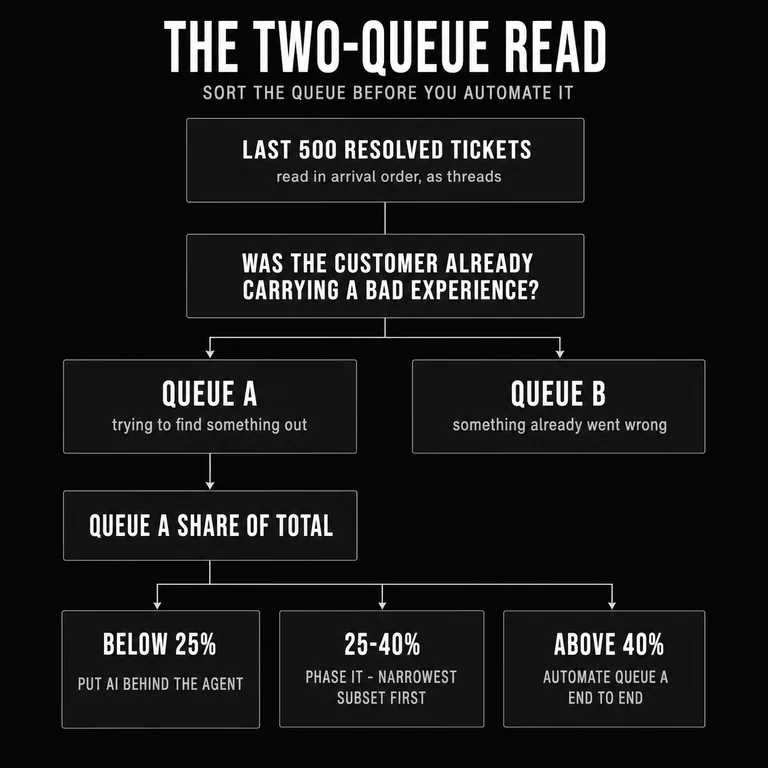
The diagnostic we run before recommending anything is a sort, not a survey. It takes an afternoon and it settles the question most vendor demos are designed to skip: whether the volume arriving in your queue is the kind that automates well.
- Pull the sample in arrival order. The last 500 resolved tickets, read as threads—what the customer wrote, not the category the closing agent selected. If you clear more than a thousand conversations a month, 500 is a narrow window; take a full month instead.
- Sort each ticket on one question. Was this customer already carrying a bad experience when they wrote? If the message opens from something that had already gone wrong for them, it belongs in Queue B. If they are trying to find something out, it belongs in Queue A. Ignore complexity, ignore topic, ignore resolution time. Those are the lines that produce the wrong answer here.
- Compute the split. Queue A as a share of the total. Keep a third count for tickets you could not place—if that pile runs past roughly one in ten, either the question is being applied inconsistently or the queue straddles the line. Treat the number below as soft either way.
- Read the band. Where the Queue A share lands decides what happens next.
| Queue A share | What it tells you | What it implies |
|---|---|---|
| Above 40% | Most of what arrives is people trying to find something out. | Automate Queue A end to end. The design problem moves from whether to automate to how fast a Queue B message reaches a person. |
| 25–40% | The queue is genuinely mixed. | Phase it. Automate the narrowest Queue A subset—the requests with a single factual answer, like order status, delivery windows, appointment slots, password resets—and route the rest to a person. Re-run the read in a quarter. |
| Below 25% | Most of what arrives is repair work. | Do not automate the front door. Put AI behind the agent instead—retrieval, drafting, summarizing prior contact—where it shortens the response without being the response. |
Hybrid models outperform full automation for most businesses. The strongest evidence is a field study of 5,172 support agents at a software company rolling out an AI assistant — “Generative AI at Work,” by Erik Brynjolfsson, Danielle Li, and Lindsey Raymond, in the Quarterly Journal of Economics in 2025. Agents with the assistant resolved roughly 15% more issues an hour. The average hides the finding that matters: the least experienced agents gained about 30%, and the most experienced gained close to nothing. That study compares agents with the tool against agents without it, not people against autonomous AI. The case for augmentation is not that it beats a bot. It is that it lifts the part of your team that is still learning the job.
For customer service professionals, the advice is parallel: focus development on capabilities AI cannot replicate. Emotional intelligence, contextual judgment, and relationship continuity are durable advantages in a landscape where routine task performance is increasingly commoditized.
None of the three is built by attending anything. Emotional intelligence is practiced against real material: pull your own Queue B conversations, take the ones that went badly, and review them with a peer on a standing cadence. It is the calibration session QA already runs for compliance scoring, pointed at a harder question—did this person feel heard, or did they feel processed. Contextual judgment builds only where there is room to exercise it; an agent who can issue the remedy develops it, and an agent who routes every exception to a supervisor never will. Relationship continuity is not a personality trait at all. It is a routing decision, and it requires that the same agent can take the follow-up—which most queue systems are configured to prevent.
The Two-Queue Read measures the split, not the size. Two companies with the same ticket count and the same average response time can land in different bands and owe their customers opposite decisions. Nothing on a vendor’s comparison sheet will tell you which one you are.
Key takeaways:
- Run the Two-Queue Read on real tickets before evaluating vendors—the split between information requests and repair requests is what decides the answer.
- Hybrid models (AI + human) consistently outperform full automation for most use cases.
What Does the Future of AI in Customer Service Look Like?
The near-term direction is toward AI that predicts needs rather than just responds to them—systems that analyze behavioral patterns, purchase history, and service interactions to surface issues before customers raise them. That capability already exists in early form at T-Mobile, which announced a multiyear partnership with OpenAI in September 2024 to build IntentCX, a platform trained on the carrier’s own interaction history to read customer intent and act on it rather than wait to be asked.
Physical environments are also entering the picture. Microsoft’s robotics partnership program is exploring AI that bridges digital and physical service contexts, relevant to hospitality, healthcare, and retail sectors where the service interaction spans both. AI-powered concierges, intake tools, and scheduling systems are already in early deployment in some of these environments.
The companies positioning themselves well are not racing to automate the most. They are designing systems where AI handles load and humans handle relationship—and the line between the two is the one the Two-Queue Read draws: a message that opens from something already gone wrong reaches a person. That distinction will increasingly separate brands that deepen trust from brands that merely reduce cost.
Key takeaways:
- Predictive support is the next phase: identifying customer needs before they become support tickets.
- Physical and digital integration is emerging, particularly in hospitality, retail, and healthcare.
Conclusion
AI is changing customer service faster than most businesses have adapted. The companies navigating this well are not those moving fastest to automate. They are the ones being deliberate about which interactions benefit from automation and which require human presence.
The technology is capable enough to handle a significant share of routine support at scale. The risk is in applying it indiscriminately. Customer service is where brand promises meet real experience.
At Subverse we build brand systems — strategy, language, design, and the experience itself — so that every signal a company sends carries the same meaning. Service is one of those signals. A support queue is not an operational layer sitting beneath the brand: it is the brand, arriving at the moment a customer is paying closest attention to what the company actually does.
That is why treating service as a cost center to be automated is a coherence problem before it is an operational one. Whatever the routing rule decides about who is worth a person’s time gets read against everything else the brand has said. When the two disagree, the customer believes the routing rule.
The question for any business is not whether to use AI in customer service. The question is where automation serves your customers and where it signals that you have stopped paying attention.